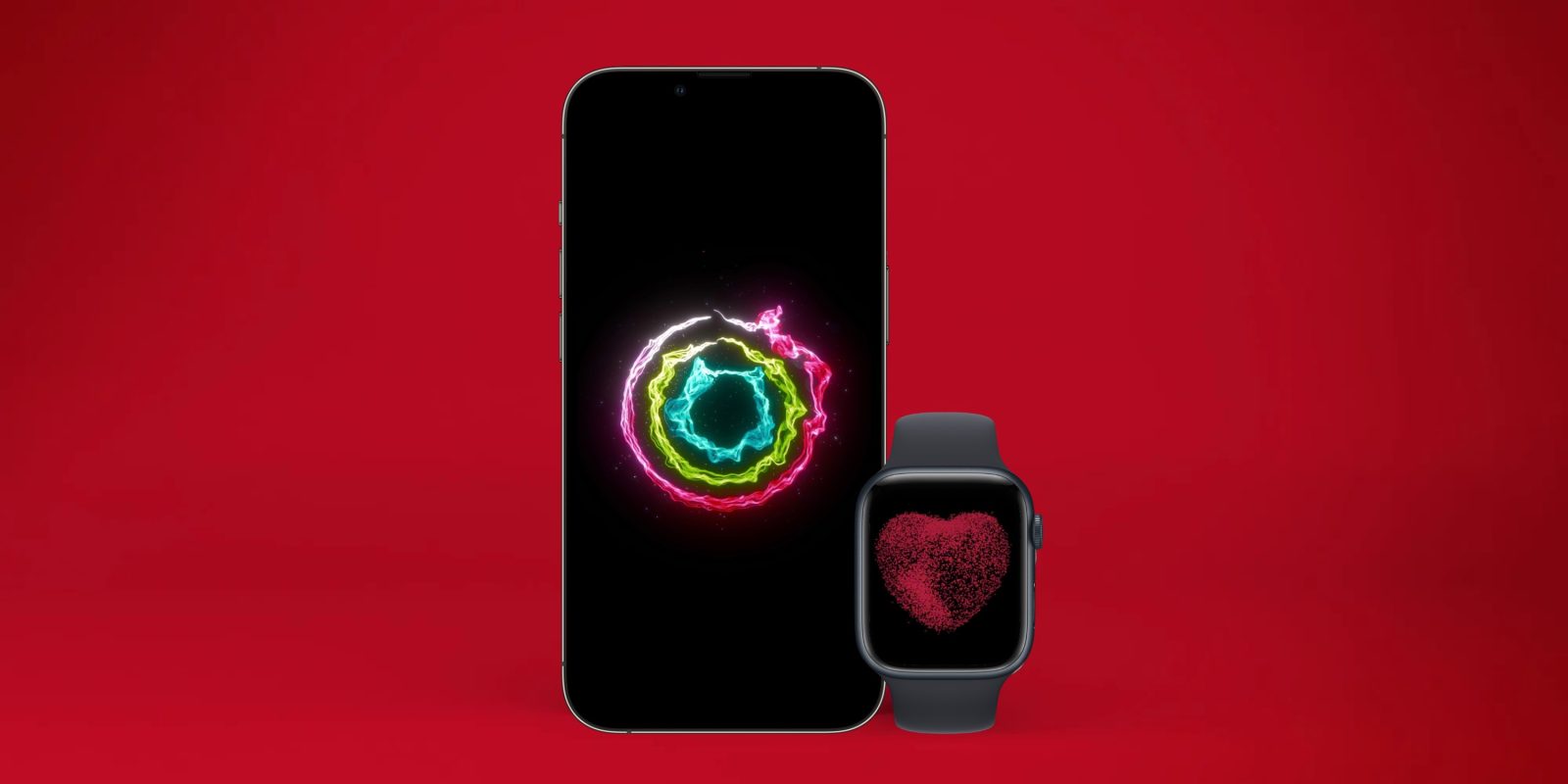
Apple Health: Top feature for Watch and iPhone

Apple Health: Top feature for Watch and iPhone

Today, April 7 is World Health Day. With that in mind, we’ve got a round-up of some of the most valuable health features to check out (or revisit) on Apple Watch and iPhone, with third-party accessories and apps that sync with Apple Health, tips on avoiding back pain at your desk, and more.

We’ll start out looking at the native health and fitness features on iPhone and Apple Watch and finish up with some third-party accessories and apps that bring features and tracking Apple doesn’t offer. We’ll wrap up with with tips on preventing back pain and neck strain while at your computer and do’s and don’ts for keeping your iPhone clean.

iPhone health features
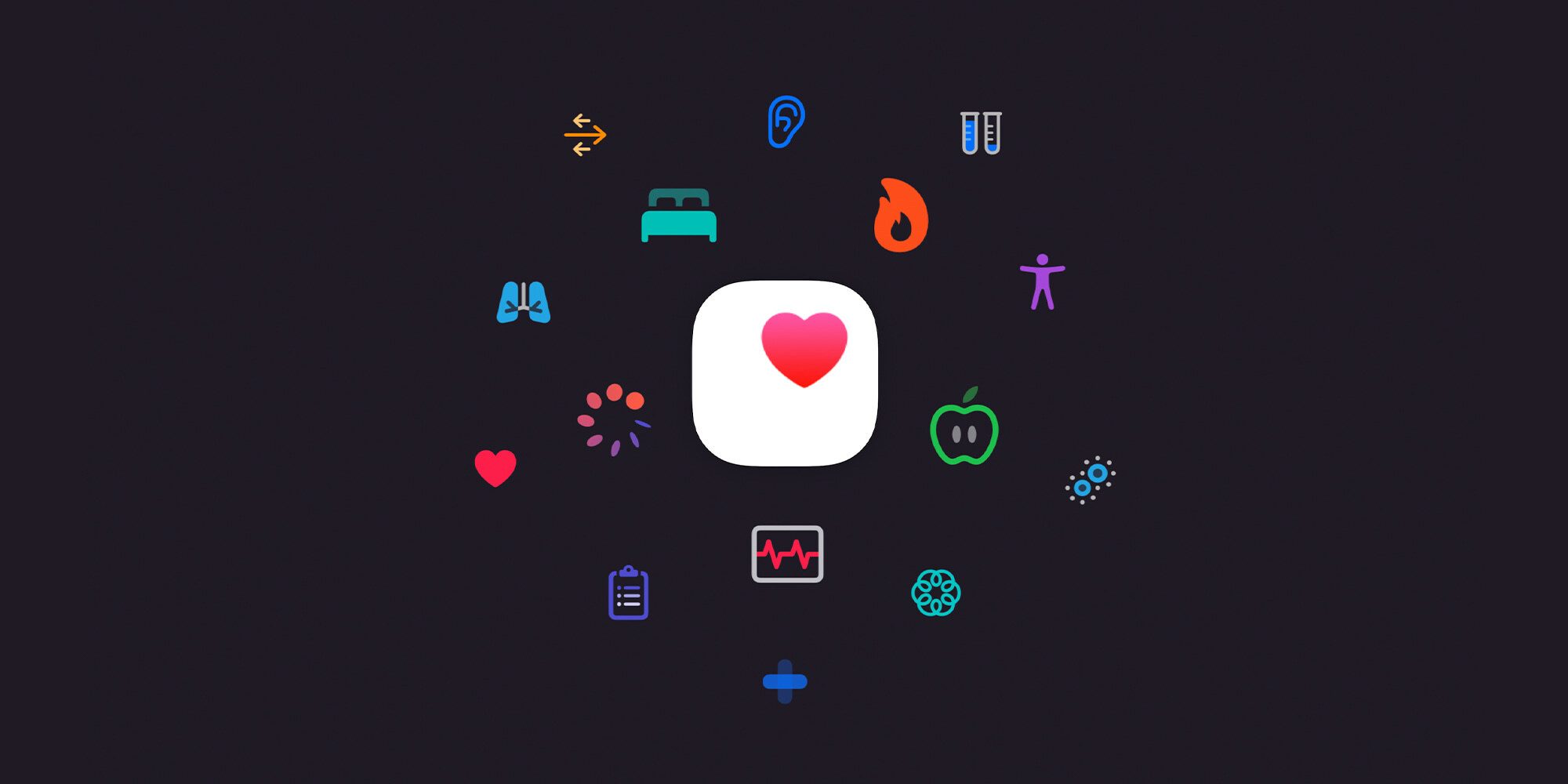
Apple Health features iPhone

The two main native places to dig into health features with iPhone are with Apple’s:

With the Fitness app, you’ve got a hub for all your fitness and movement data. Swipe down when looking at the main Summary tab to see your various Trends over time.

The Fitness app, naturally, includes Apple Fitness+ if you want to try out the service for the first time or give it another shot if it’s been a while.

Meanwhile, Apple’s Health app stores a broader range of data with categories including activity, body measurements, cycle tracking, hearing, heart, medications, mindfulness, mobility, nutrition, respiratory, sleep, symptoms, vitals, and other data.

All this health data can be manually or automatically saved when using iPhone, Apple Watch, and other Apple Health-supported accessories and apps.

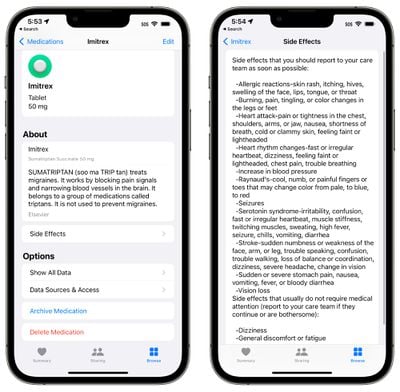
One neat new option that arrived with iOS 16 is the ability to track and manage supplements and medications in Apple’s Health app.

Apple Watch health features

While you can view all of your health and fitness data on iPhone, Apple Watch is a seamless way to track activity, heart health, and much more – which is automatically saved with iPhone. Here are some valuable features to try out or revisit:

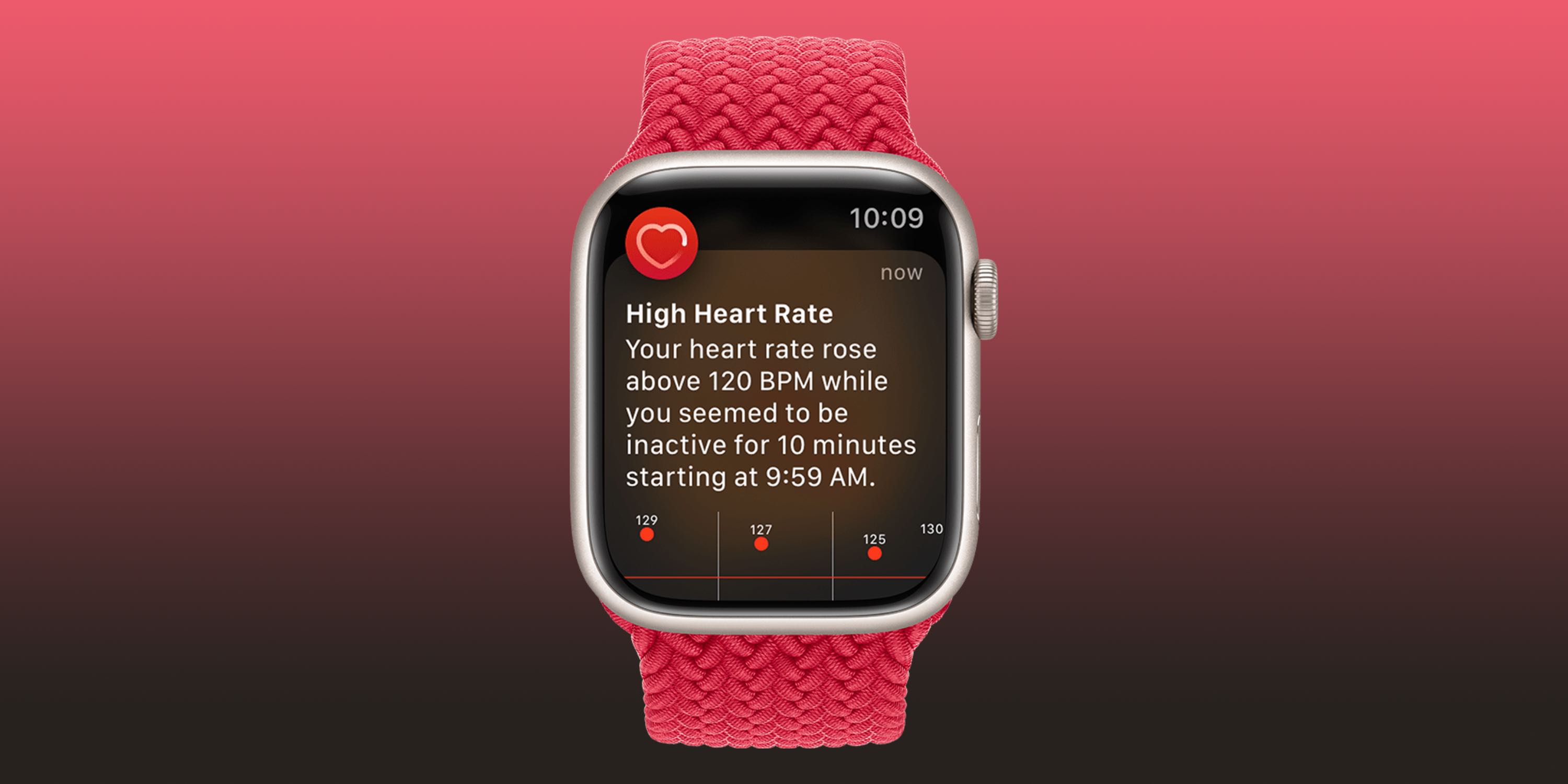
High and low heart rate notifications
Apple Health features Apple Watch
  • If you’d like an alert when your heart rate dips below or rises above a certain threshold and remains there for 10 minutes while inactive, this feature is available for those 13 years old and up.
  • If you didn’t turn it on the first time opening the Heart Rate app or want to change it:
  1. Open the Watch app on your iPhone
  2. Swipe down and choose Heart (under the My Watch tab)
  3. Tap High Heart Rate > pick a threshold
  4. Tap Low Heart Rate > pick a threshold

Irregular heart rhythm notifications

Here’s what this feature does:

“If you receive a notification, the irregular rhythm notification feature on your Apple Watch identified an irregular rhythm suggestive of AFib and confirmed it with multiple readings.
If you have not been diagnosed with AFib by a physician, you should talk to your doctor.

To make sure this feature is set up:

  1. Open the Health app on your iPhone
  2. Choose Browse in the bottom right corner
  3. Now tap Heart
  4. Swipe down and look for Set Up under Irregular Rhythm Notifications
  5. If you don’t see that in the Health app, open the Watch app on iPhone
  6. Swipe down and tap Heart (under the My Watch tab)
  7. Tap the toggle next to Irregular Rhythm

ECG and AFib History
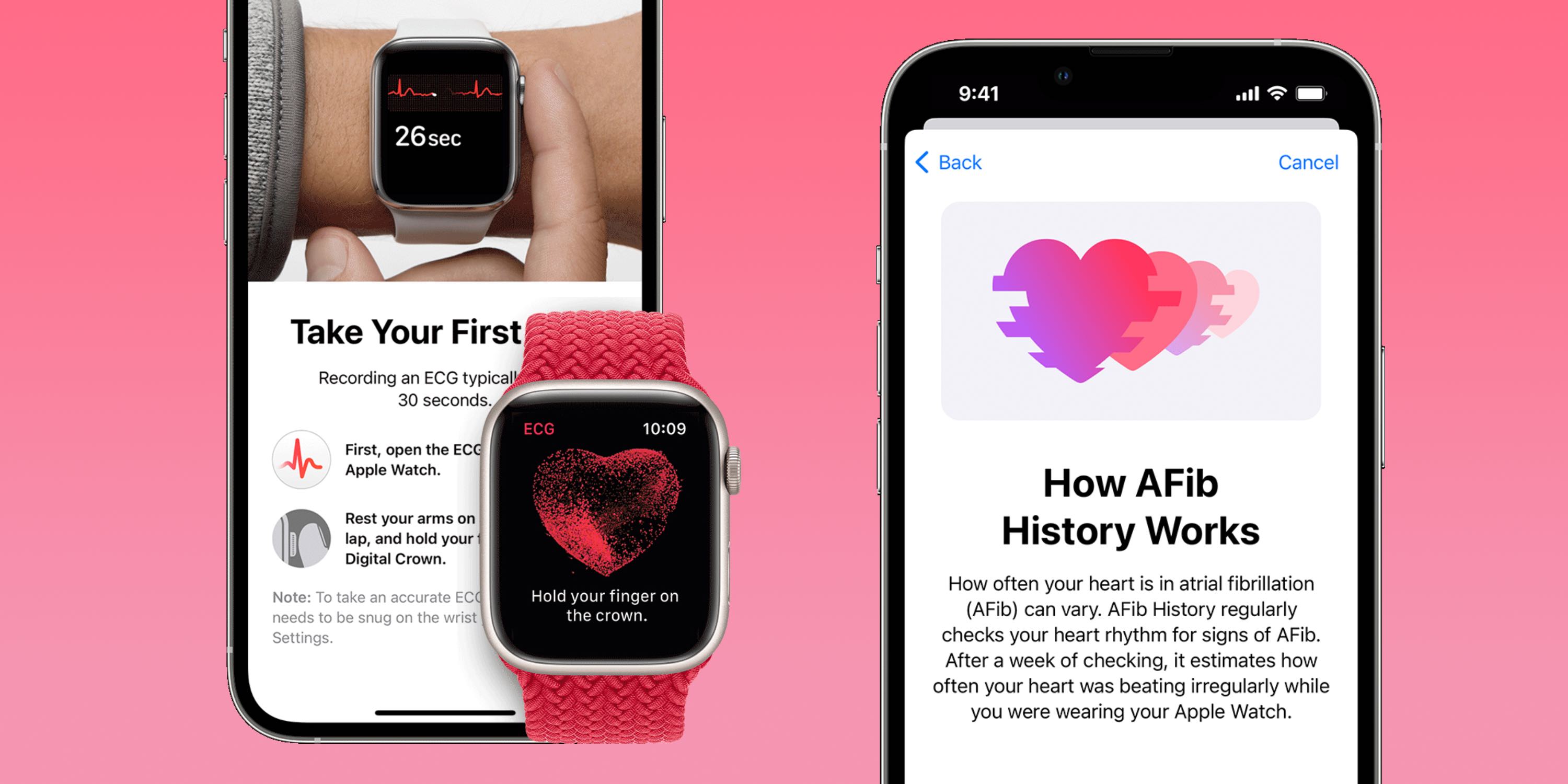
  • The ability to take ECGs with Apple Watch arrived with Apple Watch Series 4 in 2018 starting in the US. In the years since, the valuable and impressive feature has expanded to over 100 countries.
  • ECGs are for Apple Watch users at least 22 years old. If you haven’t used it before or didn’t set it up when you first got your watch:
  1. Open the Health app on your iPhone
  2. Choose Browse in the bottom right corner
  3. Now tap Heart > ECG > Set Up
  4. You can also set up the more recent AFib History feature – this regularly checks for signs of AFib in the background
  5. Head back to the Health app on your iPhone
  6. Browse > Heart > look for Set Up near the bottom under AFib History

Apple highlights that after an ECG “Regardless of the result, if you aren’t feeling well or are experiencing any symptoms, you should talk to your doctor.”

Cardio Fitness

Here’s how Apple describes Cardio Fitness (VO2 max):

“Cardio fitness is a measurement of your VO2 max, which is the maximum amount of oxygen your body can consume during exercise. Your cardio fitness level is a strong indicator of your overall physical health and a predictor of your long-term health.”

Check out how to get going with this or view your data in our full guide:

Cardio Recovery

Like HRV and VO2 max, Cardio Recovery or heart rate recovery is a lesser-known health metric that’s measured by Apple Watch every time you track a workout. Cardio Recovery measures how much your heart rate decreases immediately after exercise. As with heart rate variability, heart rate recovery (HRR) offers a look at your heart health by how fast it responds to the autonomic nervous system.

Learn how to set it up and more in our full guide:

Heart rate variability (HRV)

Heart rate variability (HRV) is automatically captured by Apple Watch but it’s not viewable in the wearable’s native Heart Rate app. You’ll need to head to the iPhone’s Health app > Browse > Heart.

What is HRV? It’s the measurement of how the interval of time between heartbeats changes, measured in milliseconds – notably this is a metric that changes a lot, so looking at broad trends, not daily numbers is most helpful.

HRV is considered by many in the medical field as a powerful indicator of not only current overall health and resilience of the heart and body but also a strong predictor of future mortality.

HRV is also often used as a signal to understand when the body is ready for exercise or rest. All of this is thanks to HRV showing how responsive the heart is to our autonomic nervous system.

Heart data history

On Apple Watch

  1. Head to the Heart Rate app on your Apple Watch to see daily data (app with heart icon)
  2. You’ll see your current heart rate, swipe or scroll down with the Digital Crown
  3. Now you can see your resting rate, walking average, workout heart rate, and heart rate recovery data (if you’ve done a workout recently)
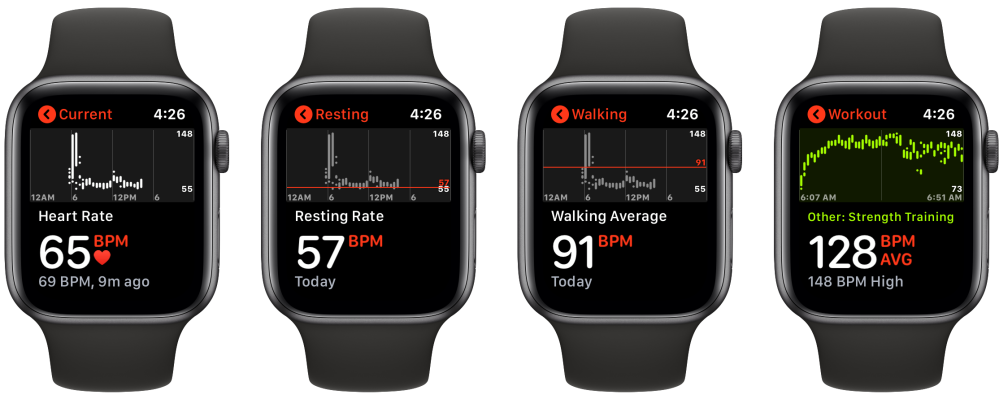
How to see heart rate history Apple Watch

Heart rate history on iPhone

Checking your heart rate history captured by Apple Watch on iPhone gives you the most data, here’s where to find it:

  1. Open the Health app on your iPhone
  2. Tap the Browse tab in the bottom right corner, then Heart
  3. On the main page, you’ll see the various heart rate categories. Tap one to see your history
  4. At the top, you can change the data window between hourly, daily, weekly, monthly, and yearly (H, D, W, M, Y)
  5. Toward the bottom, you’ll see heart rate highlights and more information about each type of heart rate data

Further down in the main Heart section, you’ll see more data like Cardio Fitness, ECG results, blood pressure readings, and low/high/irregular heart rate notifications.

Sleep-tracking

Apple Watch includes native sleep tracking but if you want to get richer data, there are a number of great third-party apps you can use. Check out all the details in our full guide:

Apple Health-supported accessories and apps

Compatible with Apple Health, the Withings Body Cardio smart scale is one of my favorite accessories. It even offers a Vascular Age feature that measures the “speed at which the blood pressure pulse propagates through the circulatory system.”
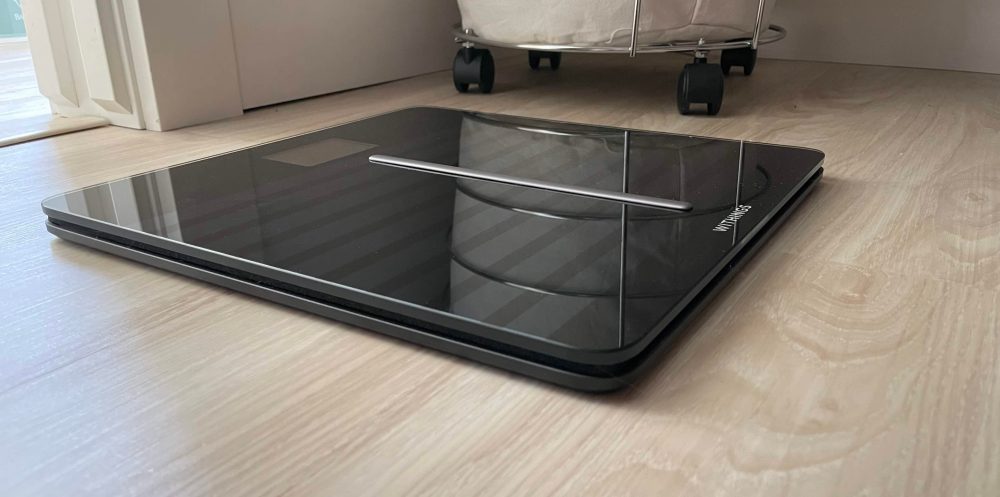
With those measurements, the smart scale is able to determine your arterial stiffness and health with a comparison to the average of people in your age group.

Body Cardio also tracks weight, BMI, body composition (water, fat, bone, and muscle), heart rate tracking, and more.

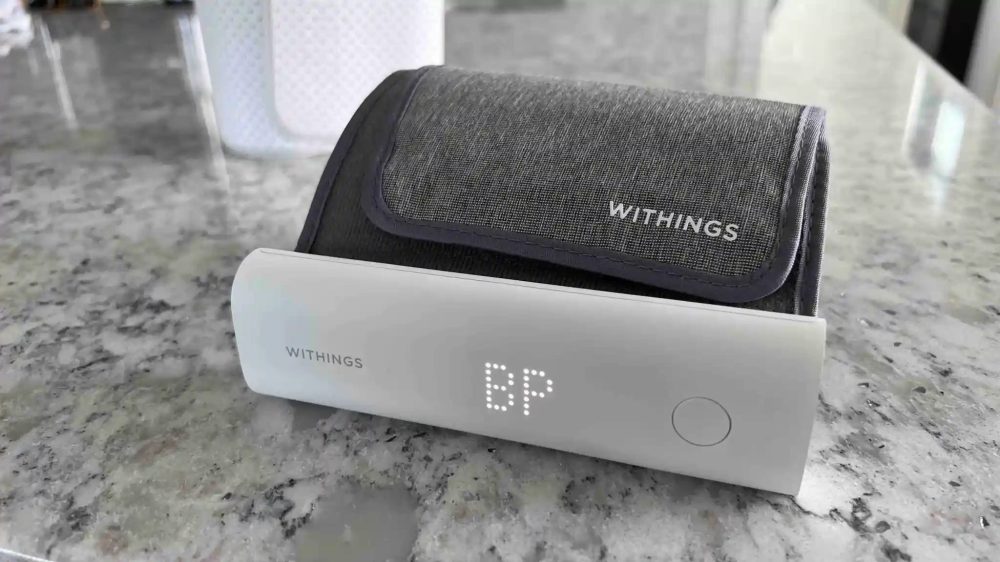
And if you want a seamless way to measure and track your blood pressure with Apple Health, the Withings BPM Connect is a great option.

There are of course many more accessories that record health data with iPhone, just look for the “works with Apple Health” when you’re looking around.

Some of my favorite apps that work with Apple Health include:
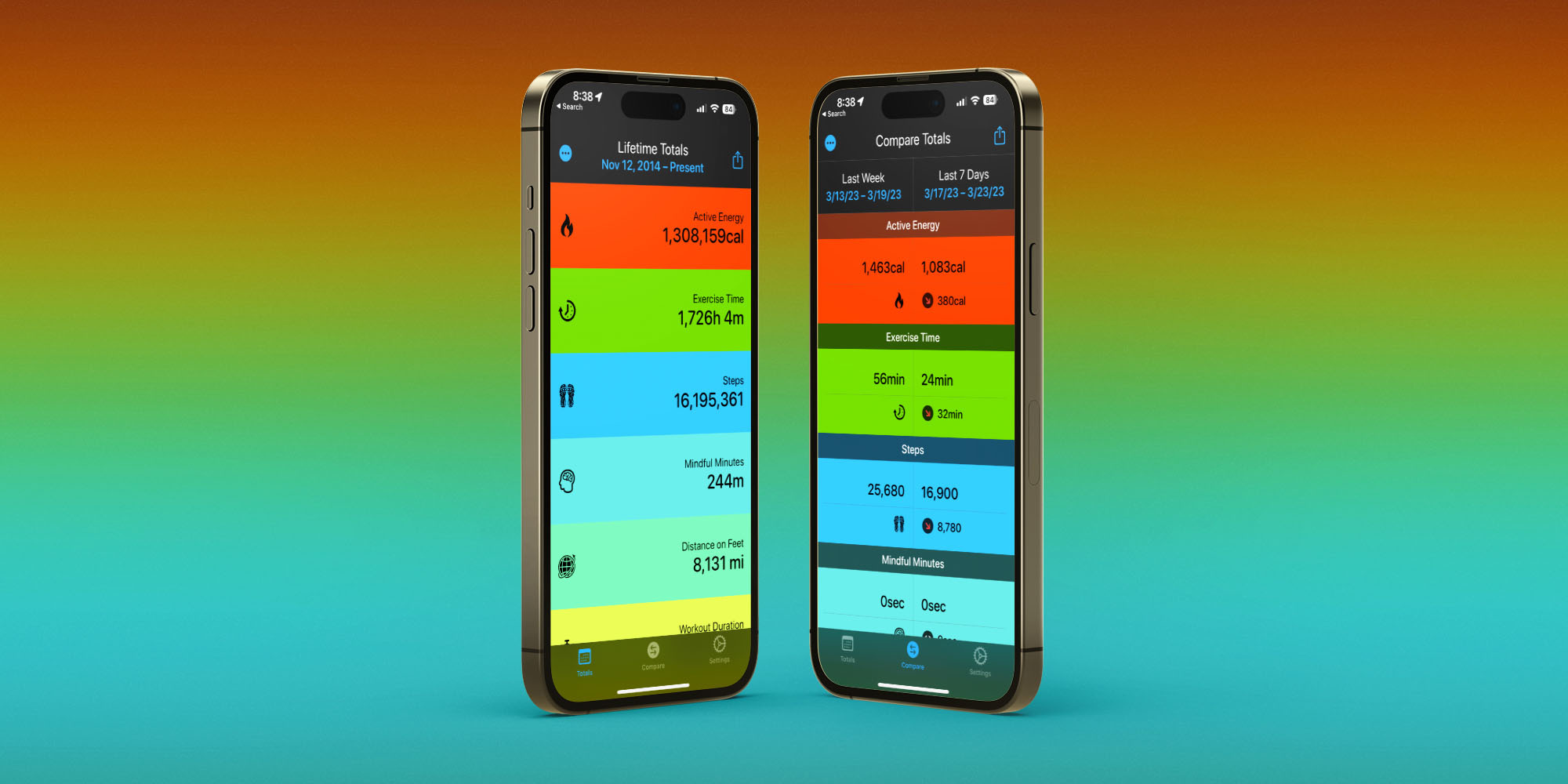
Fitness Stats 2

Posture, computer height, more

For tips and tricks on how to sit properly at your desk, do’s and don’ts for cleang your iPhone, and more, check our these guides:

FTC: We use income earning auto affiliate links. More.
Apple Lets Users Search For Marijuana And Pharmaceutical Interactions In Latest iPhone Health Update

Apple Lets Users Search For Marijuana And Pharmaceutical Interactions In Latest iPhone Health Update

The latest version of Apple’s Apple iphone program offers people an solution to observe medications and learn about possible drug interactions with other substances—including marijuana.

As the hashish legalization movement has progressed, the know-how huge has been progressively revising guidelines about the many years that usually align with the normalization of hashish. The most recent illustration is the iOS 16 update to Apple’s Wellness app.

End users can convey to the Wellbeing application if they use liquor, cannabis or tobacco to look for for “potential interactions between drugs on your list.”

A footnote on Apple’s press launch about the Health and fitness application update last week states that the treatment and interaction details “is proof-dependent written content certified from Elsevier, a major publisher of wellbeing and science info.”

“The Drugs attribute should not be applied as a substitute for specialist professional medical judgment,” the tech company cautions. “Additional details is available on the labels of drugs, but consumers ought to seek the advice of their health care service provider prior to creating any choices associated to their overall health.”

Though cannabis continues to be federally illegal, there have been a variety of research released more than the several years that counsel hashish could interact with prescribed drugs like warfarin. According to Prescription drugs.com, there are almost 400 “known” interactions amongst recommended medicines and marijuana, 26 of which it categorizes as “major.”

Lots of states that have legalized cannabis for healthcare or recreational needs also have labeling specifications for marijuana solutions to warning buyers about feasible wellness hazards. Most of those warnings concentration on impaired driving and typical aspect outcomes of cannabis like drowsiness.

Florida’s clinical hashish legislation does need labels to record feasible contraindications, but it’s not crystal clear what supply well being officers use to compile that checklist.

In any circumstance, the Apple update that lists cannabis together with the federally authorized substances alcohol and tobacco does serve as an additional case in point of the mainstreaming of cannabis in Significant Tech.

Past year, Apple finished its coverage of limiting cannabis businesses from conducting business enterprise on its Application retail outlet. The cannabis shipping provider Eaze subsequently declared that individuals were being equipped to store and pay for goods on its Iphone app for the very first time.

Amazon’s new announcement that it will no for a longer period be drug screening employees for hashish is an additional indication that key tech firms are embracing cannabis’s political and social ascendance.

Still, some players in tech industry have had a strained connection with the cannabis market.

Previously this year, New York cannabis regulators asked the social media application TikTok to finish its ban on advertising that requires the phrase “cannabis” as they get the job done to promote public training on the state’s transfer to legalize.

On Fb, condition-authorized cannabis companies, advocacy groups and govt entities like the California Bureau of Cannabis Control have complained of getting “shadow banned,” where their profile web pages do not clearly show up on a typical research. There were being reports in 2018 that the social media giant would be loosening its restrictive hashish policies, but it is unclear what techniques its taken to accomplish that.

The same problem exists on the Facebook-owned Instagram, where people have regularly explained that their accounts have been deleted by the application more than cannabis-related articles even if they weren’t promoting the sale, or selling the use, of hashish.

In 2020, Twitter began partnering with a federal drug company to encourage compound misuse therapy resources when buyers of the social media platform research for “marijuana” or specified other substance-relevant keywords—but no these kinds of wellbeing warning appears with final results for liquor-related terms.

In distinction to Apple, Google’s Android app hub current its plan in 2019 to explicitly prohibit programs that join consumers with cannabis, no make any difference irrespective of whether it is legal in the jurisdiction the place the consumer lives.

Irrespective of marijuana corporations being banned from Google’s app current market, some of the company’s prime officers look really bullish about loosening cannabis rules. Google co-founder Sergey Brin joked about supplying workforce with joints at a put up-election conference in 2016.

California Governor Signs 10 Cannabis Payments, Which includes Interstate Commerce, Employment Protections And File Sealing

Marijuana Second is built doable with assistance from readers. If you depend on our cannabis advocacy journalism to keep knowledgeable, be sure to take into consideration a regular Patreon pledge.

Apple Watch, iPhone set to focus on 17 health, fitness areas in 200 nations

Apple Watch, iPhone set to focus on 17 health, fitness areas in 200 nations
&#13
&#13
&#13

&#13
With iOS 16 and watchOS 9 this slide, Apple Watch and Iphone will offer you characteristics that emphasis on 17 areas of health and physical fitness, from heart wellness to snooze, women’s well being, mobility and additional, according to the tech huge.

&#13

&#13
Apple customers can now keep around 150 various styles of well being info from Apple View, Iphone, and related third-occasion apps and gadgets. They can also pick out to share specified types of this health knowledge with loved ones.&#13

&#13
These capabilities, available in nearly 200 countries and territories, supply end users with superior-excellent facts collected during the working day and night, mentioned the business.

&#13

&#13
As pandemic clearly show us the relevance of currently being in shape and wholesome, Apple is producing devices and solutions packed with “science-dependent technological innovation” that equips people today with even additional info and functions as an clever guardian for their health and fitness, “so they are no for a longer period travellers on their have well being journey”, in accordance to Jeff Williams, Main Functioning Officer at Apple.

&#13

&#13
The enterprise feels drawn to this perform not only because of the option to enable advance human health but “due to the fact we are pushed by our ideas to commit expertise, means, and experience to where by we can do the most great.”

&#13

&#13
“We feel passionately that technological innovation can perform a role in improving well being outcomes and encouraging persons to stay a healthier day,” he claimed in a latest Apple Overall health report.

&#13

&#13
The Cupertino-based mostly corporation mentioned that its software programming interfaces (APIs) are enabling 3rd-occasion developers to make new solutions that boost wholesome life and innovation in wellness.

&#13

&#13
“There are now tens of 1000’s of applications on the App Retail store that use our HealthKit API, so they can include facts consumers decide on to share from the Well being application to supply modern health and health experiences, with rigorous privacy and details security protocols,” in accordance to the report.

&#13

&#13
With users’ authorization, these applications can also lead info back again to the Wellbeing application.

&#13

&#13
Apple not long ago collaborated with Stanford College in the US to establish the Apple Coronary heart Review, which was a initial of its kind in the healthcare community and the major digital cardiac scientific review in the course of its time.

&#13

&#13
“It paved the way for Apple’s operate with some of the world’s foremost establishments to construct three very first-of-their-type research studies to advance the science across women’s wellbeing, listening to well being, coronary heart wellness, and additional,” mentioned the report.

&#13

&#13
Health institutions are employing Apple units, APIs, and frameworks to fortify the partnership in between doctors and individuals with significant facts, and enable treatment from anywhere.

&#13

&#13
According to the report, wellness organisations and insurance policy companies close to the planet have collaborated with Apple to combine Apple Watch in their wellness programmes to advertise much healthier behaviours and enhance personal health at a huge scale.

&#13

&#13
“Our do the job primarily falls into two categories: own well being and exercise attributes on Apple View and Apple iphone, and the work we are undertaking with the clinical group to support exploration and treatment,” explained Williams.

&#13

&#13
–IANS

&#13

&#13
na/

(Only the headline and picture of this report may perhaps have been reworked by the Business enterprise Typical staff members the rest of the articles is vehicle-created from a syndicated feed.)

&#13

Expensive Reader,

Business Conventional has generally strived difficult to give up-to-date data and commentary on developments that are of curiosity to you and have broader political and financial implications for the place and the globe. Your encouragement and frequent opinions on how to improve our supplying have only made our resolve and commitment to these beliefs more powerful. Even for the duration of these difficult periods arising out of Covid-19, we proceed to continue to be committed to trying to keep you educated and up to date with credible news, authoritative views and incisive commentary on topical troubles of relevance.
&#13
We, having said that, have a ask for.&#13

As we fight the financial impact of the pandemic, we have to have your assistance even far more, so that we can keep on to provide you extra quality content material. Our subscription design has viewed an encouraging reaction from many of you, who have subscribed to our on-line content material. A lot more subscription to our on the internet material can only assist us reach the goals of supplying you even superior and far more relevant material. We believe in no cost, fair and credible journalism. Your assistance by means of more subscriptions can aid us practise the journalism to which we are committed.&#13

Help excellent journalism and subscribe to Company Typical.&#13

Digital Editor&#13

iOS 16 Health and Fitness Updates: Medication Tracking, Sleep Stages, iPhone Activity Tracking and More

iOS 16 Health and Fitness Updates: Medication Tracking, Sleep Stages, iPhone Activity Tracking and More

Apple with iOS 16 extra a new medication administration characteristic to the Health app, which is created to allow consumers to hold track of their prescription drugs to make certain a dose just isn’t skipped. The attribute is effective together with a new Medicines app on the Apple Check out, and it truly is valuable for all the things from prescriptions to nutritional vitamins.

iOS 16 Health Guide Feature
This guideline covers almost everything that you want to know about the medication tracking characteristic alongside with other new ‌iOS 16‌ Health app attributes.

Medicine Monitoring

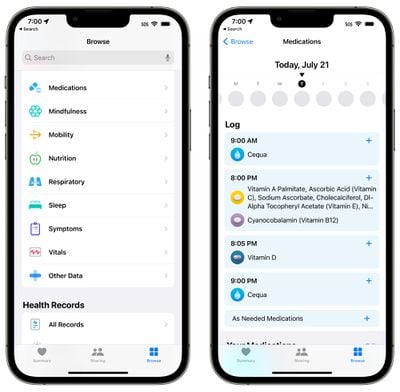
“Medicines” is a new section readily available in the Wellbeing app, available by likely to the Browse segment and scrolling down to Medicines, or typing it into the Wellness application lookup bar.

ios 16 medications section health


In the Medicines application, you can enter in all of the prescription medications, in excess of the counter remedies, and nutritional vitamins that you just take so you can get reminders to consider drugs, check out for interactions, and much more.

ios 16 medication add


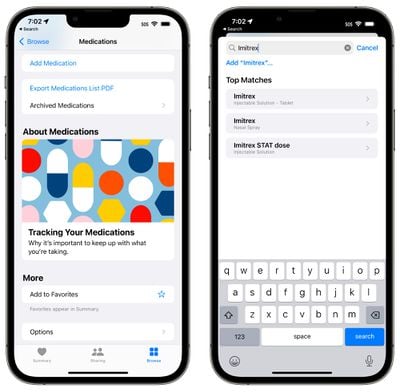
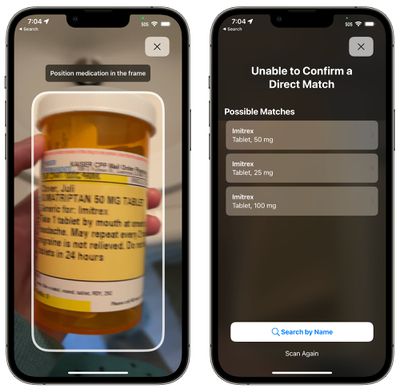
Incorporating a treatment is as basic as tapping on the Increase Medication button in the Health and fitness app. From there, you can type in the identify of a medication or vitamin, or use your iPhone’s camera to scan the label of your capsule bottle. Incorporating by way of scan is straightforward, but it won’t always choose up all the info, so you may need to manually find dose and type (capsule, spray, etc).

ios 16 medication label scan


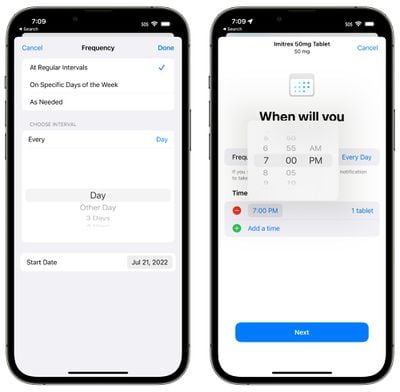
From there, you can select the frequency of when you take the medicine. You can select a certain working day or interval of days, unique times of the week, or decide for as wanted, and then you can set the time that you want to acquire the treatment.

ios 16 health schedule medicine


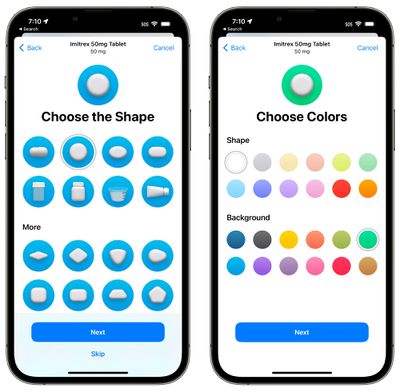
Medications can be custom made with a form and a shade to match the pill that you choose in true lifestyle for swift and simple recognition.

ios 16 health app customize medication


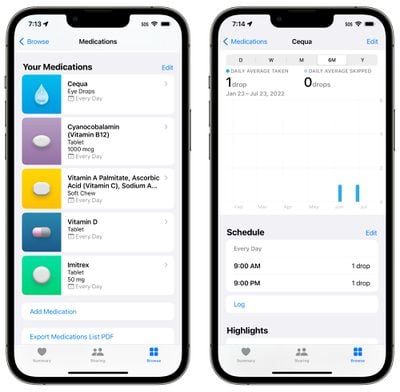
You can insert all of your prescription drugs and vitamins into the Health and fitness app, with everything viewable in a listing.

Treatment Reminders

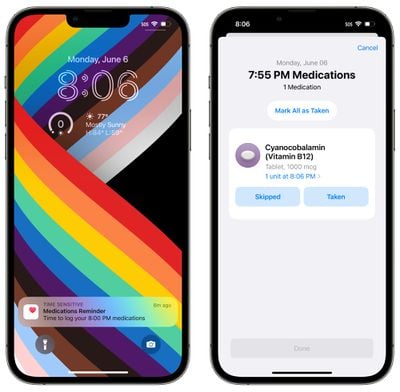
At the time you have additional your medicine to the Wellbeing application and set a time and day to take it, the ‌iPhone‌ will send out you a notification when it is really time to consider it. You can get notifications for all of the medicines in the Well being application that have been assigned a program.

ios 16 medication list health


Medication notifications are classed as time sensitive notifications and will be delivered at your specified time except you override the setting.

log medication


Notifications are computerized for all medicines that have a set time and and/or established working day for when you consider them.

Medication Logging

When a reminder notification pops up, you can faucet it to be taken to a popup exactly where you can mark a treatment as “Taken” or Skipped.” You can also use the “Mark All as Taken” possibility if you have numerous drugs scheduled for the similar time. Prescription drugs can also be marked as logged from the medication record in the Wellbeing app.

ios 16 health app medication logging


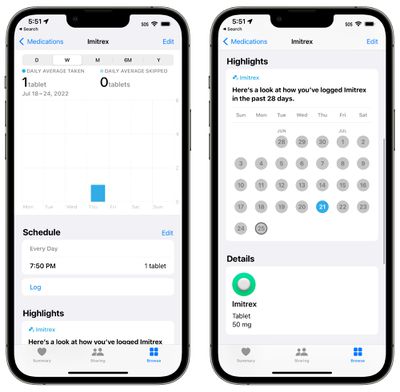
The Wellness app can track the remedies that you get about time, so you can examine in on whether you are getting your treatment regularly. You can see knowledge organized by day, week, thirty day period, 6 months, and calendar year.

Apple will also offer a Remedies “Emphasize” in your Wellness summary that will permit you know how generally you’ve got taken a treatment around the past 28 times.

Apple Check out Medicine App

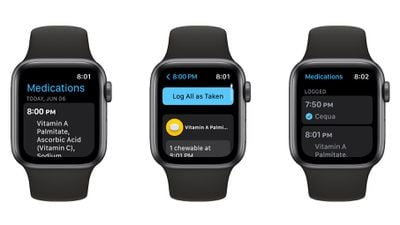
In watchOS 9, there is a devoted Remedies application that you can faucet into for faster logging. You can log every treatment separately in the app or use the “Log All as Taken” to get to them all at once. If you skipped a dose, you can decide on the “Skipped” solution.

medications watchos 9


The Apple Watch app is just for marking remedies as taken and all other medicine administration desires to be performed in the Health and fitness application.

Medication Interactions

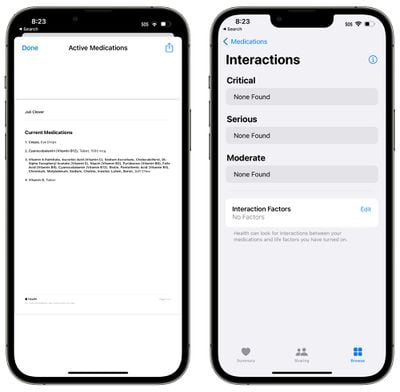
The Overall health app often checks to make sure that the medications that you are using do not have interactions with a single yet another, retaining you from having a mix of drugs that could be risky.

medication interactions ios 16

Medication Side Consequences and Other Details

If you faucet into any medication from your Well being application record, you can then pick the “Facet Effects” button to see the mentioned aspect outcomes for that medication, if it is offered.

ios 16 medications side effects


Not all prescription drugs have facet outcomes stated, and the details is presented by Elsevier, a Netherlands-centered enterprise that specializes in professional medical content material, such as the Once-a-year ScienceDirect book series on drug aspect consequences.

Export Remedies

In the Prescription drugs segment of the Health and fitness application, there is certainly an choice to “Export Remedies Checklist PDF,” which as the identify suggests, results in a easy PDF of the prescription drugs that you get. You can share this listing with a medical doctor.

Sleep Characteristics

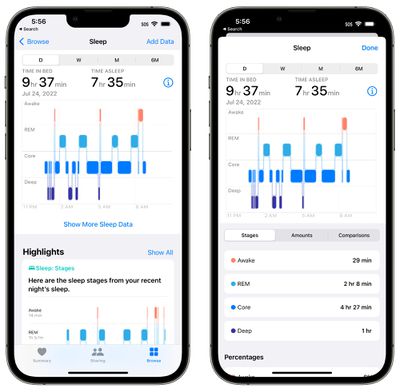
For these who don the Apple Observe to mattress for snooze tracking uses, ‌watchOS 9‌ and ‌iOS 16‌ convey new operation. Slumber recorded by the Apple Watch is damaged down into Awake, REM, Core (gentle), and Deep slumber classes, so you can get an concept of how very well you slept through the evening.

ios 16 sleep info


The Apple Look at will monitor when you get in mattress, how very long it can take you to slide asleep, how usually you wake up, and how considerably time you invest in REM, Core, and Deep sleep.

Apple defines the different snooze types as follows:

  • Awake – You may well discover yourself awake through pieces of a slumber session. It really is standard for men and women to wake up on occasion. It’s probable that you will fall appropriate again to snooze and not bear in mind waking up during the evening.
  • REM – This stage of snooze may possibly enjoy a part in studying and memory. Throughout this stage, your muscle tissues are the most calm and your eyes go swiftly from side to aspect. This is also when most of your dreams take place.
  • Main – Often referred to as light snooze, this stage is viewed as just as vital as the other people. This stage normally signifies most of your time asleep every evening. Mind waves that might be important for cognition come about through this stage.
  • Deep – Also acknowledged as sluggish wave slumber because of the mind wave styles, this is the stage in which system tissues are fixed and critical hormones are unveiled. This stage normally takes place in extended durations in the course of the very first fifty percent of your sleep session.

The sleep facts gathered by the Apple View can be considered in the “Rest” part of the Well being application. Snooze knowledge can now be viewed by working day alternatively than just by week so you can drill down into your slumber top quality on a working day by day foundation.

Other than the new sleep classes, the Rest performance is the similar. You nevertheless use the very same Bedtime and Wake Up options, which tie in to the Wind Down and Rest Concentrate possibilities.

Wellbeing Sharing Invitations

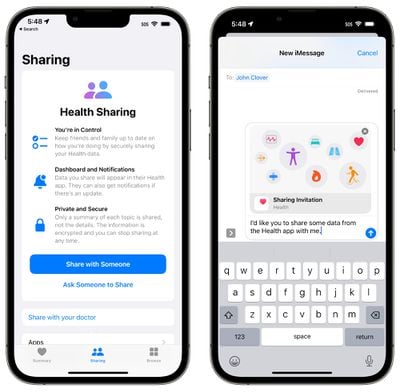
You can invite spouse and children users to share their data with you in ‌iOS 16‌, creating it quick to maintain track of the well being information and facts of elderly family users or children. At the time an invitation is received, the human being can decide to select which data to share with you.

ios 16 health sharing

Exercise Action Monitoring

In iOS 15 and before, you necessary an Apple Look at to consider benefit of the Exercise application, but that’s transformed in ‌iOS 16‌.

fitness app ios 16


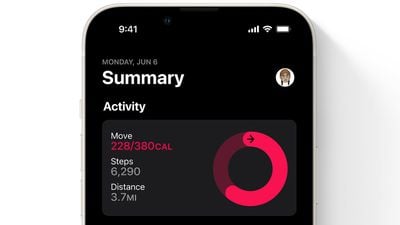
You can use the Physical fitness application with the ‌iPhone‌’s motion sensors to track your action stage. The ‌iPhone‌ can estimate steps, length walked, and monitor third-bash routines to present particulars on how a lot of energy you have burned in a day.

With no an Apple Look at, you might be restricted to a everyday Move aim, with out the Work out and Stand plans readily available.

Information Feed-back

Have queries about the new Health and fitness and Health attributes in ‌iOS 16‌, know of a function we remaining out, or want to provide feed-back on this guide? Ship us an electronic mail here.